AI form builder for application forms
Describe your grant, award or open call in a sentence and Dapple builds the application form for you. Then go further than any form builder, with the stages, review rounds and automations to run the whole programme.
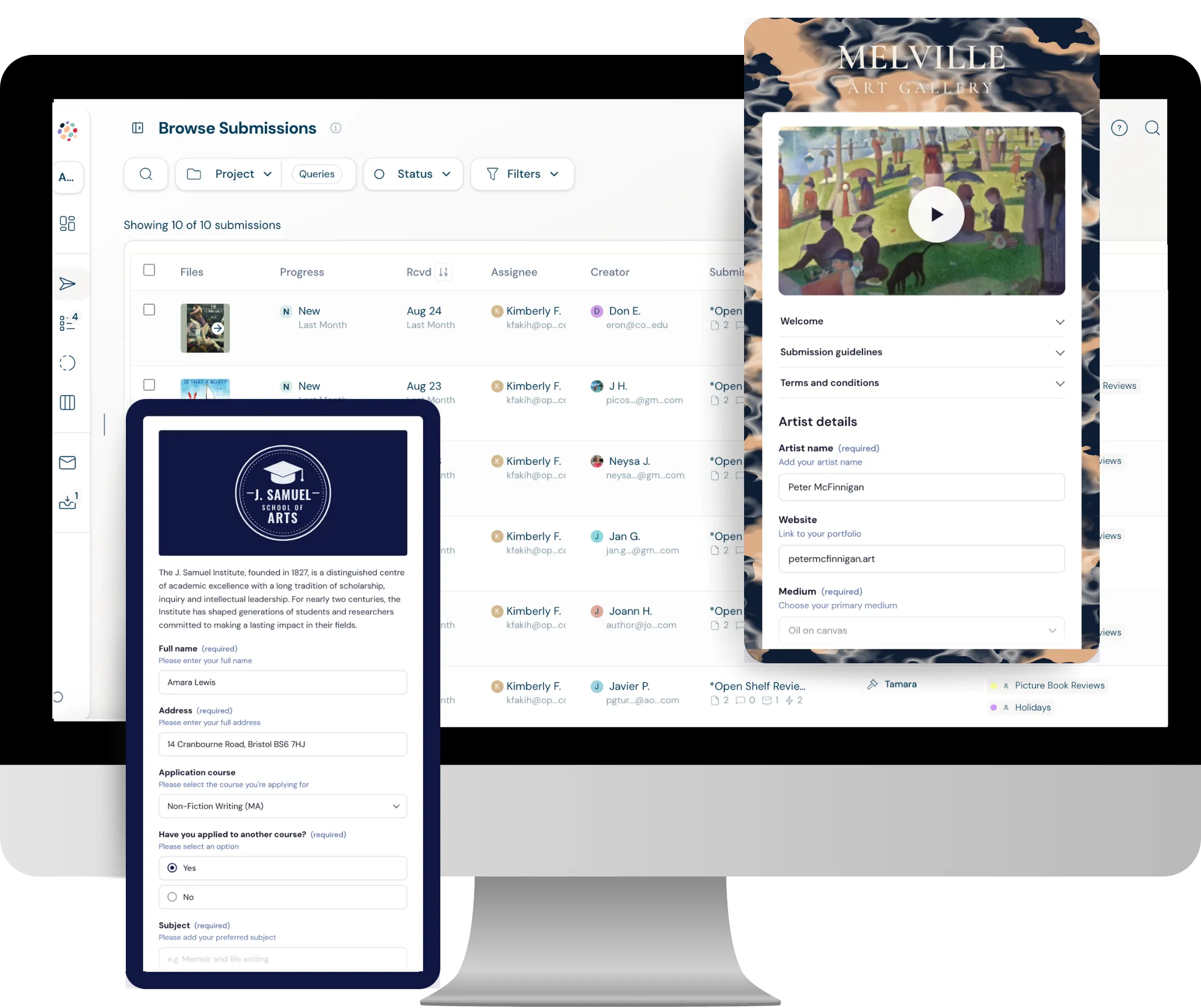
What is an AI form builder?
An AI form builder creates a form from a written description, so you don't have to add every question by hand. Dapple's AI form builder is made for application forms: grant applications, award entries, fellowships, residencies and open calls. Describe what you're running, check what it builds, and publish.
AI form builder prompts to try
Write it the way you'd brief a colleague. The more you say about who can apply and what you need, the better the form.
“An application form for a £5,000 community arts grant. Applicants must be UK-based organisations. Ask for a project summary, a budget breakdown and two supporting documents.”
“Entry form for an annual photography award with three categories. Up to five images per entry, a short artist statement and a £25 entry fee.”
“A fellowship application for early-career researchers. Include eligibility questions, a CV upload, a 500-word research proposal and two referee contacts.”
“Open call for a group exhibition on the theme of water. Artists submit up to three works with titles, dimensions, medium and a price.”
Describe it
AI application forms from a single prompt
Tell Dapple what you're running, who can apply and what you need from them. The AI form builder turns that into a complete application form, with the right questions, sections and file uploads, ready for you to check.
- Plain English: No form logic to learn. Describe your grant, award or open call the way you'd explain it to a colleague.
- Application-ready: Get eligibility questions, applicant details, project questions and uploads, not a generic contact form.
- Your starting point: Everything the AI builds is fully editable, so you stay in control of every question.
Customise it
A fully customisable form for any kind of project
Too much legacy application software still gives applicants old, clunky forms that are hard to change. Dapple gives you the design freedom of a modern form builder, so every form looks fresh and fits exactly what you're running.
- Steps: Break long applications into clear sections applicants can move through at their own pace.
- Conditional logic: Show applicants only the questions that apply to them.
- Branding and backgrounds: Add your logo, header, colours and background images so the form looks like yours.
- Rich content: Embed images, galleries and YouTube videos to show applicants exactly what you're looking for.
- Any file type or size: Accept PDFs, images, video, audio and portfolios.
- Application fees: Add a single, multiple or conditional fee, paid straight into your own Stripe account.
Launch it
Built for applications, not surveys
Applications take longer to fill in than a survey, and applicants need to trust the process. Dapple's forms are designed for exactly that.
- Save and return: Applicants can save a draft and finish later, with automated reminders before the deadline.
- Edit while live: Fix a typo or add a question after launch without losing applications already submitted.
- Any device: Forms work on phones, tablets and desktops.
- Pages: List several open opportunities on one branded page, each with its own form.
More than an AI form builder: start from a complete project
A form is only the first step. With Dapple you can pull in a pre-built project template for your type of programme, complete with customised stages, review rounds and automations, all ready to go.
The application form
Questions, sections, uploads and fees, ready to edit.
Customised stages
A stages board that matches how your programme runs, from new to shortlisted to selected.
Review rounds
Scoring and review set up for each stage, ready for you to invite your reviewers or judges.
Automations
Automated steps that kick in as applications move through your stages.
Form builders, legacy application software and Dapple
Form builders make modern forms. Legacy application software runs the review. Dapple does both.
| What you get | Typical AI form builder | Legacy application software | Dapple |
|---|---|---|---|
| Build a form from a prompt | |||
| Modern, fully customisable form design | |||
| Collect files and payments | |||
| Stages for every application | |||
| Review rounds with scoring and votes | |||
| Message applicants about decisions |
Frequently Asked Questions
An AI form builder creates a form from a written description, so you don't have to add every question by hand. In Dapple, you describe your grant, award, fellowship or open call and the AI form builder creates a complete application form that you can then edit.
Yes. Describe your grant, who's eligible and what you need from applicants, and Dapple's AI form builder creates the application form, including eligibility questions, project questions and document uploads. You can then edit any question, add conditional logic and brand the form before you publish it.
Grant applications, award and competition entries, fellowship and scholarship applications, residency applications, open calls for work and other submission forms. The forms can include file uploads of any type and size, and application or entry fees through Stripe.
Yes. Everything the AI creates is a normal Dapple form, so you can add, remove or reword any question, change the order, add sections and set up conditional logic. You can even edit the form after it's live without losing the applications already submitted.
Fully. Build any kind of form for any purpose, with steps, conditional logic, your own branding, colours and background images, and embedded images, galleries and YouTube videos. Accept any file type or size and add application fees through Stripe. Every form stays fresh and modern, so applicants enjoy filling it in.
No. Neither Dapple nor the AI providers it uses train or fine-tune AI models on your data. You can read the details in Dapple's AI policy.
Typeform, Jotform and Tally are popular general form builders: they make good-looking forms, but the review and decision-making usually happens somewhere else. Legacy application software has the review tools but often clunky forms that are hard to customise. Dapple has both: a fully customisable, modern form builder and everything that comes after it, including stages, review rounds, free reviewer accounts, automations and applicant messaging.
A project template is a ready-made Dapple project for a type of programme, such as an award, grant or open call. It comes with the application form, customised stages, review rounds and automations already set up, so you can review the details, make changes and launch.