Grant fund management
Track grant money from budget to payment. Set up funds, award money to successful applicants, and schedule, approve and record each payment in the same place you run your applications.
What is grant fund management?
Grant fund management is how a funder tracks money from the budget it sets aside to each payment a grantee receives. Dapple replaces the funding spreadsheet with budgets, funds, awards and payment schedules that sit alongside your applications, so everyone on the team sees the same figures.
How budgets, funds, awards and payments fit together
- 1
Budget
An optional organisation-wide amount for a date range. Funds draw from it.
- 2
Fund
The money set aside for one project or programme, in a single currency.
- 3
Award
The amount each successful applicant receives from a fund.
- 4
Payment
One instalment of an award, with an amount, due date and payment method.
You pay, Dapple keeps the record. Dapple never moves, holds or sends money. You pay grantees from your own bank as usual, and Dapple tracks the schedule, approvals and payment details. There's nothing to set up with a payment provider, and no percentage taken from the grants you pay.
Budgets and funds
Budgets and funds with live totals
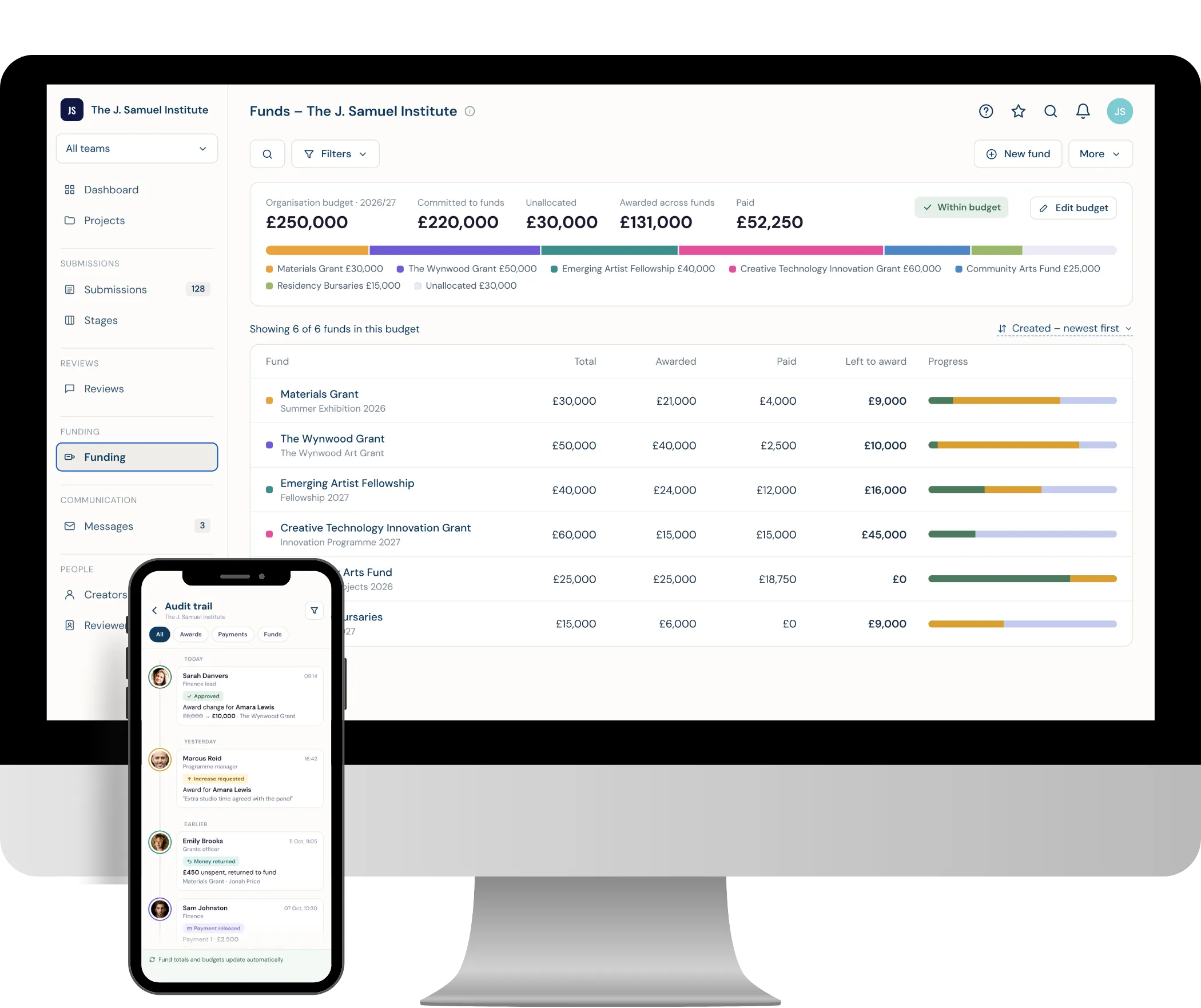
Set aside money for each programme and see, at any moment, how much has been awarded, paid and is still left to award.
- Organisation budgets: Show finance how much of your overall pot is committed to funds, with a warning if funds go over budget.
- A fund per programme: Give each project its own fund and total, and increase it at any time.
- Any currency: Set each fund in the currency you pay grants in.
- Funds overview: See the total, awarded, paid and left to award for every fund, with a progress bar for each.
Award funds
Award grant money in a few clicks
Allocate money from a fund to your successful applicants one at a time or in bulk, with Dapple keeping a live count of what's left to award.
- Award in bulk: Award a whole stage from the Stages board, a filtered list of submissions, or straight from the fund.
- Flexible amounts: Use each applicant's requested amount, give everyone the same amount, or split a total equally.
- Never overspend: Dapple won't let awards take a fund over its total, and shows the remaining balance as you go.
- Several funds: A submission can receive awards from more than one fund, each tracked separately.
Payment schedules
Payment schedules and release conditions
Split each award into instalments with due dates, and hold any payment until the conditions you set are met.
- Templates: Start from a single payment, two 50/50 payments, quarterly payments or milestones, or build your own.
- Apply to a whole fund: Give every award in a fund the same schedule in one go.
- Release conditions: Hold a payment until a condition is met, such as a signed grant agreement, or a milestone is reached.
- Always within budget: Dapple won't let you schedule more than the award.
Approvals
Approvals, two-person sign-off and payment records
Built for grant managers and finance teams alike. Add the checks your finance team expects to every payment, and keep a clear record of each one.
- Two-person sign-off: One person approves a payment and a different person records it as paid.
- Named approvers: Choose who can approve payments and award changes for each fund.
- Clear statuses: See at a glance what's scheduled, on hold, ready to pay, approved, processing or paid, with overdue payments flagged.
- Payment records: Log the date, method and reference for each payment, so it matches your bank statement.
Awardee updates
Keep awardees and your team up to date
Awardees always know what they're getting and when, and your team never misses a payment that's due.
- Awardee view: Awardees can see their award, what's been paid and what's coming next in their own account.
- Payment messages: Let awardees know automatically when you record a payment, using your own templates.
- Reminders: Chase an awardee for anything that's holding up a payment, such as a signed agreement.
- Team alerts: Get reminders when payments fall due, a daily approval list and a weekly overdue summary.
Changes and audit trail
Every change approved and on the record
Grants change. Increase, reduce or cancel an award with the right sign-off, and keep a full history of who did what.
- Change awards: Increase, reduce, cancel or restore an award, with changes approved before they take effect.
- Money returned: Record unspent money sent back by an awardee, and it returns to the fund.
- Audit trail: See every change to awards, payments and funds, with who made it and when.
- Live totals: Funds and budgets update automatically as awards and payments change.
What each payment status means
Every payment moves through clear statuses, and anything past its due date is flagged as overdue.
| Status | What it means |
|---|---|
| Scheduled | Set for a future date. It counts towards the award but hasn't been paid. |
| On hold | Waiting for a condition, such as a signed grant agreement, before it can be approved or paid. |
| Ready to pay | Due, with nothing blocking it. It can be approved or recorded as paid. |
| Approved | Signed off by an approver. Someone else records it as paid. |
| Processing | Sent to your bank or finance team but not yet confirmed. |
| Paid | Recorded as paid with a date, method and reference, and locked. |
| Cancelled | Won't be made. The amount goes back to the award. |
Want the details? Read the fund management guides in our help centre.
Frequently Asked Questions
Grant fund management software tracks grant money from the budget through to each payment. In Dapple you set an optional organisation budget, create a fund for each programme, award money to successful applicants and schedule, approve and record each payment, so your whole team works from the same figures instead of a spreadsheet.
No. Dapple never moves, holds or sends money. You pay awardees from your own bank as usual, and Dapple records the schedule, approval and payment, with a date, method and reference for each one so it's easy to match against your bank statement.
Yes. Award a whole stage from the Stages board, a filtered selection from the submissions list, or pick applicants straight from the fund. Use each applicant's requested amount, give everyone the same amount or split a total equally. Dapple won't let awards take a fund over its total.
Yes. Each award can have a payment schedule. Start from a template, such as a single payment, two 50/50 payments, quarterly payments or milestones, or build your own, and apply the same schedule to every award in a fund in one go.
Yes. Set a release condition on any payment, such as "Grant agreement signed", or tie it to a milestone. The payment stays on hold, and can't be approved or paid, until your team ticks the condition off. You can also send the awardee a reminder.
Two-person sign-off means one person approves a payment and a different person records it as paid. It's set per fund and is on by default, and you choose who can approve payments and award changes for each fund.
Yes, if you turn it on for the project. Awardees see their total award, what's been paid, each payment's status and upcoming due dates in their own account. Internal notes, fund names and approver details stay hidden.
Yes. Each fund has its own currency, such as GBP, and its awards and payments are tracked in that currency. Dapple doesn't convert between currencies, so set each fund up in the currency you pay those grants in.
Yes. You can increase, reduce, cancel or restore an award, and record money an awardee returns. Changes can require approval from the fund's named approvers, and every change is kept in the award's history and the audit trail.
Last updated October 2026.