Performing Arts
From the first audition submission to the final callback, Dapple keeps every headshot, recording and review in one easy-to-use platform, so your team can focus on the performers, not the paperwork.
Customisable submission forms
Customisable submission forms
Get creative with fully customisable submission forms. Add your branding, headers or background images to get the look and feel you want.
- Pre-built templates: Ready-made templates to duplicate or tweak. Smart form generators also enable you to create forms from scratch with prompts.
- Beautiful forms: Increase the submission rate by adding branding, headings and background imagery - they look great!
- Customise: Set up visibility, date ranges, and create different forms for different calls or opportunities.
- Pages: Collate all your different links to forms on one single organisation page.
- Multiple attachments: Need audio or video files for auditions? Large PDFs for scripts or high-res images for headshots? No problem - Accept any file type, any size.
Run multiple calls
Run multiple calls
Running simultaneous calls or opportunities? No problem - create each one with different rules, details and forms and manage them all from a single dashboard.
- Calls: Toggle between different calls, each with different rules, dates, timings, judges, forms and run them all at the same time.
- Data: See all awards data and analytics in one single dashboard.
- Users: Add multiple users with different permissions and add them to different teams. Create panels of reviewers that can be assigned to different sets of submissions.
- Advanced filtering: Filter by your programme, tags, stages, status and even individual form fields and answers.
Manage your submissions
Manage your submissions
Save hours in admin by using the many different management tools within the platform.
- Manage with ease: There are filters, tags, ranking, scores and voting. See a persons previous submissions and outcomes.
- Stages: Divide your submissions into custom stages and create automations for each stage.
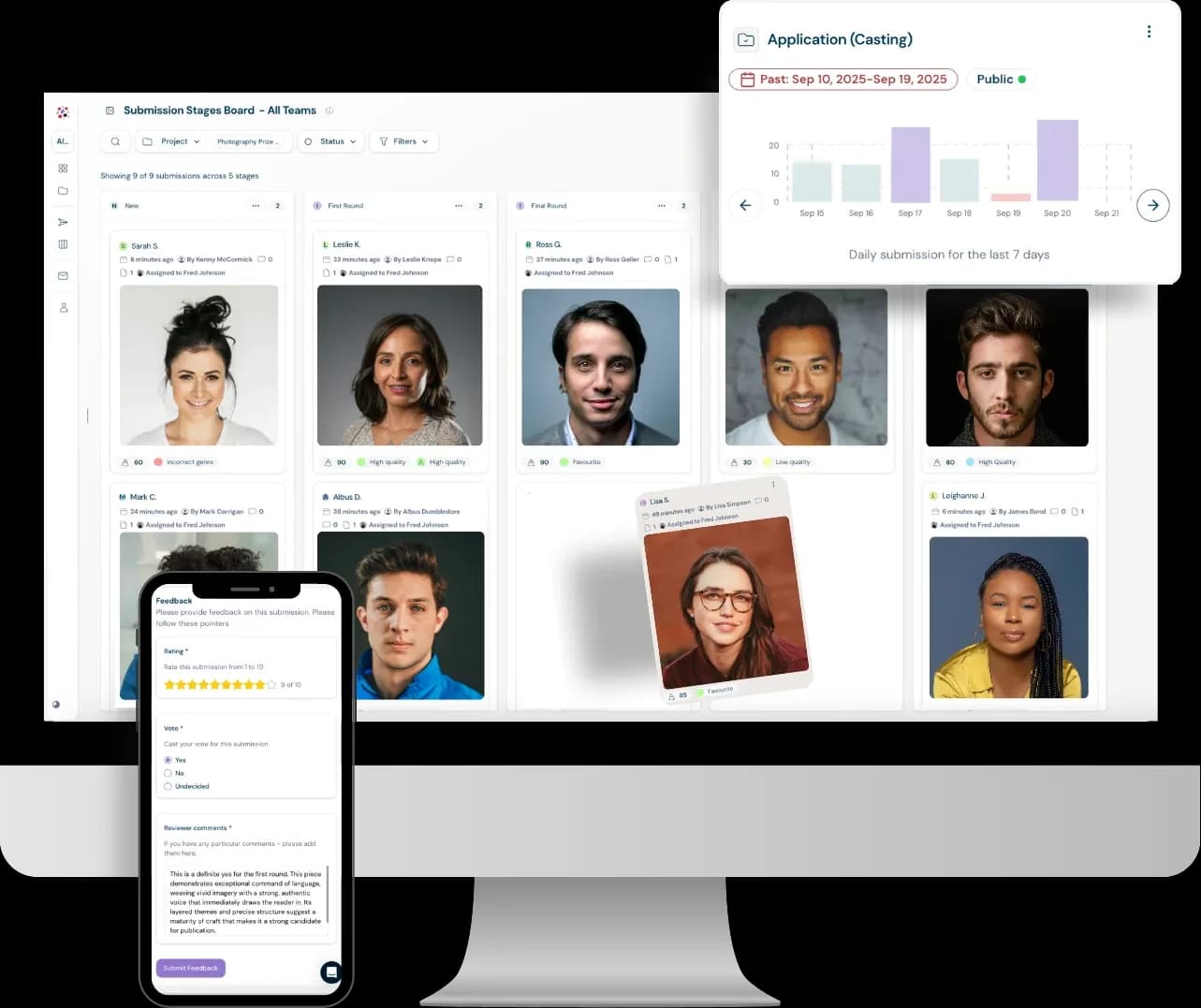
- A visual board: A drag and drop kanban board displaying all submissions across all stages.
- Bulk actions: Message thousands of applicants in one go with with bulk actions.
- Draft reminders: Automate reminder messages to those with draft entries, nudging them to finish.
Review at speed
Review at speed
Cut your review time by using intuitive review options and using the review round feature to get feedback from a dedicated panel of internal/external users.
- Review: View or play attachments in-platform without the need to download. Simply toggle through submissions with ease.
- Quick actions: Send a submission to a pre-created stage in one click.
- History: See a creator's previous submissions and tags with links to those submissions.
- Export: Download individual submissions as PDF's or get a CSV export of multiple submissions in one click.
Visualise the journey
Visualise the journey
The Stages kanban boards give you advanced workflow opportunities as well as a visual birdseye view of the whole submission journey.
- Images: See a holistic view any attached images such as artworks, photographs or headshots in one gallery board.
- Boards: Visualise the progress of each candidate by dragging and dropping or automating between stages in your boards.
- Customise: Create an unlimited number of stages across each project each with bespoke actions and automations.
- Automate: Automatically send call updates or audition info to all candidates who reach a certain stage.
Put your performers in the spotlight
Put your performers in the spotlight
Give the talent you select a stage beyond the audition room. Publish a public gallery of your finalists, cast, ensemble or programme line-up, ready to share with audiences, venues and press.
- Straight from the audition: Each performer's card uses the name, bio, photos and media already in their submission.
- Line-up in minutes: Pick a stage, such as Cast or Finalists, and everyone in it appears on the page automatically.
- Sell the show: Add a button to each performer that links to tickets, a showreel, their website or a booking enquiry.
- Public vote: Turn on voting to let audiences pick an audience award or a people's favourite.
- Your stage, your look: Match the page to your branding, and reorder or hide performers whenever the line-up changes.
Frequently Asked Questions
It's a platform that lets performing arts organisations, casting directors, and arts programmes collect and manage applications for auditions, casting calls, and performance opportunities — replacing email chains, Dropbox folders, WeTransfer links, and spreadsheets with one centralised system.
You can use ready-made templates or generate a form from scratch with prompts using an AI-powered smart form generator. Forms can include branding, headings, and background imagery, with custom visibility and date ranges for each call.
Yes, you can accept any file type or size, including audio and video for auditions, large PDFs for scripts, and high-res images for headshots.
You can create multiple calls, each with its own rules, dates, judges, and forms, and manage them all from a single dashboard with combined data and analytics. Different users and reviewer panels can be assigned to different calls.
Yes, the platform shows a creator's previous submissions, tags, and outcomes, with links back to those entries, so reviewers have full context when assessing a new application.
Submissions move through a customisable kanban-style board with stages such as shortlisted, callback, or offer. You can drag and drop entries between stages, automate actions, and automatically send call updates or audition information when a candidate reaches a certain stage.