Contests & Competitions
Collect entries, take entry fees, run judging rounds and public voting, and announce your winners, all in one platform. No more Google Forms, messy spreadsheets and overflowing inboxes.
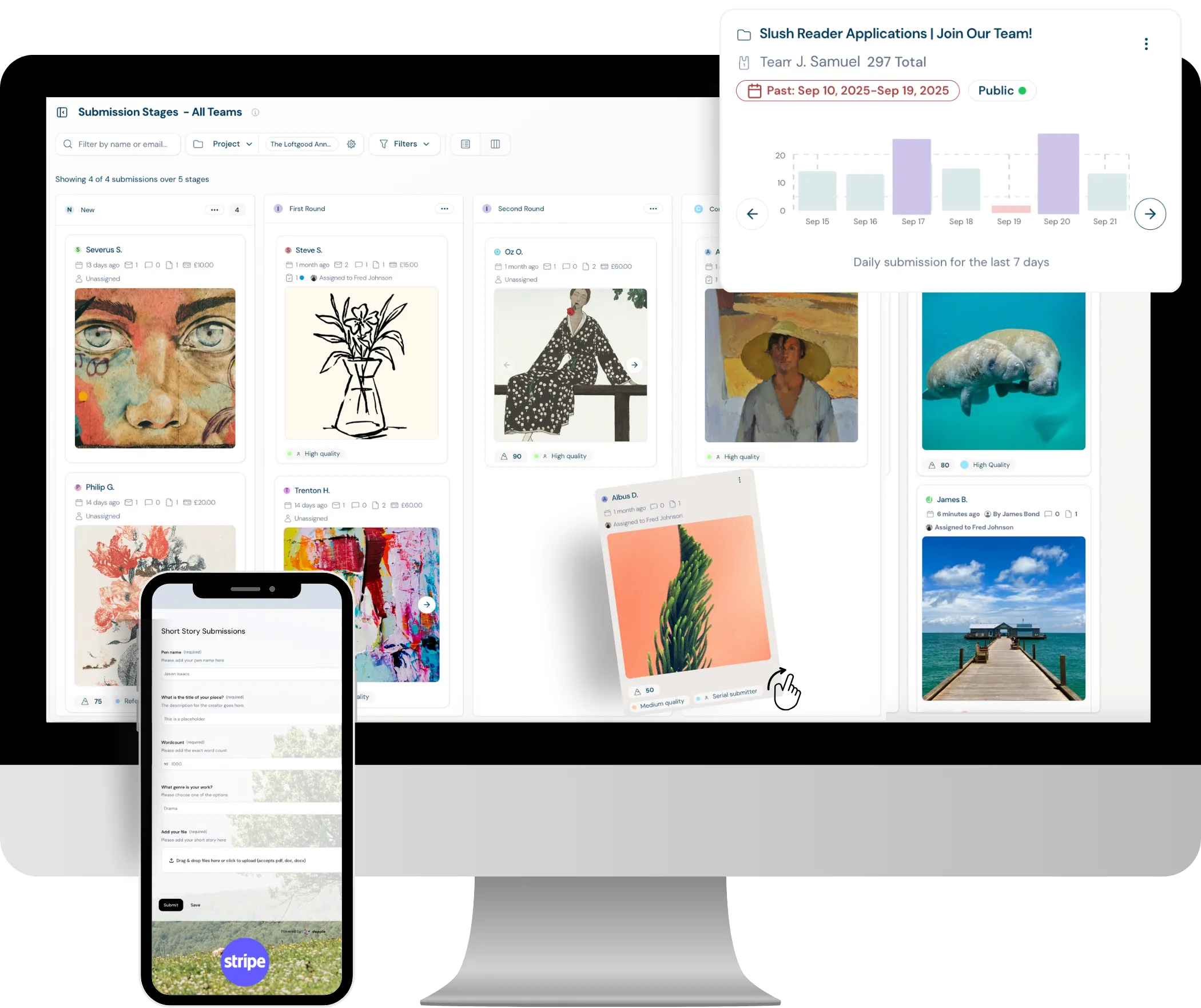
Customisable entry forms
Customisable entry forms
Use existing contest and competition templates to get set up in only a few minutes:
- Pre-built templates: Contest-ready templates. Simply make a few edits on the different fields to build the form you want.
- Beautiful forms: No dated, clunky application forms here. Fully customisable and branded forms give them a modern and sleek feel.
- Categories: Have different contest categories? Create bespoke forms for each one.
- Any file type or size: Accept any file type or size for high res, videos or 3D models.
- Multi-payments: Offer different submission bundles for multiple entry.
Create review rounds
Create review rounds
If your contest has judges, set up review rounds and assign some or all of the entries to your judges for external review.
- Juried entry: Automate or manually assign entries in bulk to review groups of judges.
- Flexibility: Create different review rounds for different categories or stages.
- Feedback: Setup options for judges to score, vote and comment easily from any device, anywhere in their own personal review account.
- Live updates: See all the judges scoring in realtime in the admin panel.
Visualise the journey
Visualise the journey
Get a holistic view of all your contest entries using a number of different views and dashboards:
- Stages board: Visualise the progress of submissions through rounds, dragging and dropping or automating.
- Projects Hub: See all your different categories and how each is performing in one centralised hub.
- Rounds: Create an unlimited amount of stages or rounds each with bespoke actions and automations for each.
- Dashboard: See the realtime analytics across all categories and dive deeper with different filters or time variations.
- Advanced filtering: Filter by category, tags, stages, status and even individual form fields and answers for sub-categories.
Managing all your entries
Managing all your entries
Through to your judges or your team and back, see average scoring, preferred votes and comments to manage who makes the next round.
- Manage with ease: Filters, tags, ranking, average scores and voting. Distill your data down to easily manageable amounts.
- Stages: Divide your submissions into custom rounds or stages and create automations for each stage.
- A visual board: A drag and drop kanban board displaying all submissions across all projects.
- Bulk actions: Message thousands of entries in one go with with bulk actions.
- Draft reminders: Automate reminder messages to those with draft entries, nudging them to finish.
Everything, everywhere, all at once
Everything, everywhere, all at once
There's no limit on how many contests or competitions you can run. And no barriers to how often.
- Multiple contests: Toggle between different contests, each with different rules, dates, timings, judges, forms and run them all simultaneously.
- Data: See all contest data and analytics in one single dashboard.
- Payments: See your live entry fee revenue through the inbuilt Stripe portal.
- User permissions: Create bespoke teams of users, reviewers and admins across multiple different contests.
Let the public vote
Let the public vote
Run a crowd favourite alongside your judged prizes. Share your finalists in a public gallery, open the vote to your audience, and trust that every counted vote belongs to a real person.
- Instant voting pages: Pick a stage and Dapple publishes every entry in it to a public gallery, updating automatically as entries move.
- Set the rules: Choose how many entries each person can vote for, and schedule exactly when voting opens and closes.
- One person, one voice: Voters verify with email, Google or Microsoft, so duplicate and spam votes don't count.
- Bot-proof: CAPTCHA, rate limits and IP checks stop automated vote stuffing before it skews the result.
- Results as they happen: Watch verified and total votes for every entry in real time, and export the final count to CSV.
Running a contest or competition? Forecast your potential revenue below.
Calculate Your RevenueFrequently Asked Questions
Contests and competitions benefit everyone involved. For organisations, they build an audience, attract high-quality work, raise your profile, bring your community together and can add a revenue stream through entry fees. For entrants, they offer recognition, portfolio development, networking and prizes. Managing entry fees, multiple judges and several rounds is hard without a dedicated platform. Dapple handles the whole process, from collecting entries through judging rounds and voting to the final decision.
It's a platform that handles the entire lifecycle of a contest or competition — entry collection, payments, judging, voting, and rounds — replacing makeshift Google Forms, spreadsheets, and overflowing inboxes with one organised system.
You start from contest-ready templates and edit the fields to suit your needs. You can create separate branded forms for each category, accept any file type or size (including high-res, video, or 3D files), and offer multi-payment bundles for entrants submitting more than once or early bird pricing.
You can assign entries to review rounds in bulk or automatically, with separate review rounds for different categories or stages. Judges score, vote, and comment from their own personal review accounts, and admins see live scoring updates in the admin panel.
Entries appear on a drag-and-drop stages board, where you can move submissions through unlimited custom rounds, each with its own automations. A projects hub and real-time dashboard let you see how each category is performing, with filtering by category, tags, status, and form answers.
Payments run through an inbuilt Stripe portal, where you can see live entry fee revenue alongside your contest data and analytics.
Yes, there's no limit on how many contests you can run simultaneously, each with its own rules, dates, judges, and forms. You can also create separate teams of users, reviewers, and admins for each contest.
Yes. Publish your entries or finalists to a public gallery and let your audience vote for a crowd favourite alongside your judged prizes. Each vote is verified by email, Google or Microsoft, CAPTCHA and rate limits block bots, and results can be exported to CSV. Galleries are available on the Growth and Pro plans.