Collect entry fees with Stripe
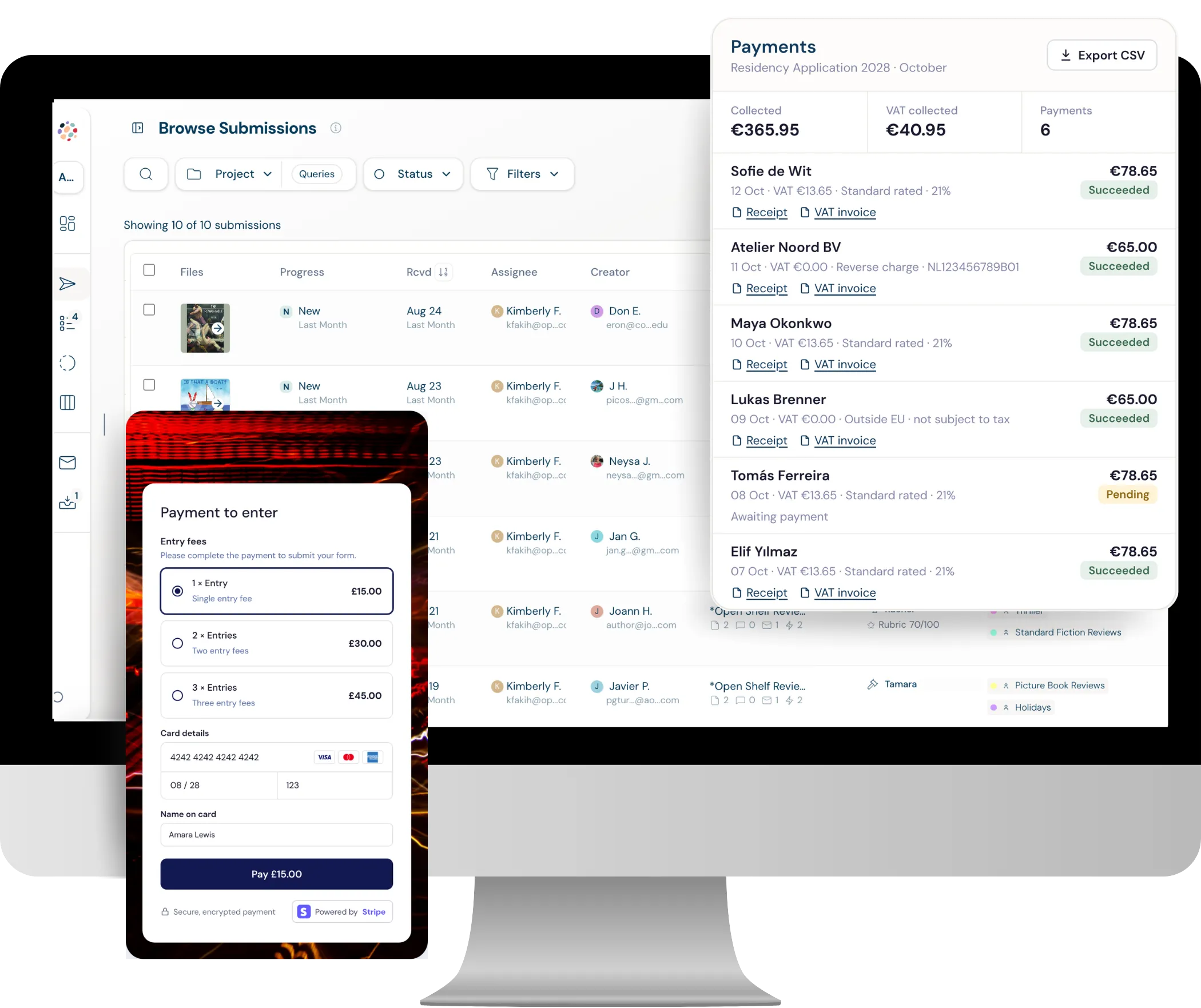
Dapple connects to your own Stripe account through Stripe Connect, so every entry or application fee lands in your account immediately, with no waiting for bulk payouts. Set pricing tiers and fee waivers, handle VAT with automatic invoices, issue refunds and run payment reports, all in the same place you manage your applications. Setup takes a couple of minutes.
Stripe Connect
How does Dapple's Stripe integration work?
Dapple is built on Stripe Connect. Every entry fee or application fee goes straight into your organisation's own Stripe account the moment an applicant pays. There's no holding period and no waiting for a platform to pay you out in bulk.
- Paid straight to you: Money lands in your connected Stripe account as soon as an applicant pays, then reaches your bank on your usual Stripe payout schedule.
- Connect in a couple of minutes: Dapple pulls through the details of an existing Stripe account, so you keep your current setup, including Stripe's discount for registered charities.
- Fully self-serve: Organisations in almost any country can create a Stripe account and start taking payments within minutes. No onboarding or setup call needed.
- Stripe reporting inside Dapple: Open your Stripe Express dashboard from Dapple to pull reports directly from Stripe.
How much does it cost to take payments?
Dapple charges 2% + £0.20 per paid transaction (2% + $0.25 in USD, 2% + €0.20 in EUR). Stripe's standard processing fees are charged separately by Stripe. Free applications carry no transaction fees.
| Currency | Dapple fee | Example | Dapple fee on it |
|---|---|---|---|
| GBP | 2% + £0.20 | £25 entry fee | £0.70 |
| USD | 2% + $0.25 | $25 entry fee | $0.75 |
| EUR | 2% + €0.20 | €25 entry fee | €0.70 |
See plan prices on the pricing page, or work out your take-home with the pricing calculator.
Flexible fees
Can you set different fees and pricing tiers?
Yes. Charge one flat fee, or set up fees that match how your award, open call, residency or scholarship actually works.
- Different fees: Set up as many fees as you need within Dapple.
- Pricing tiers: Run early-bird and standard rates, or member and non-member prices.
- Conditional logic: Show a different payment step depending on an applicant's answers, or skip payment altogether.
- Fee waivers by country: Waive fees automatically for applicants from countries on the OECD DAC list, using Dapple's built-in DAC country list.
- Your currency: Choose the currency you want to charge in.
“Seeing the payments land in our account in real time, not a month later, completely changed how we thought about the cash flow of running the call.”
 Rowan SiddonsFounder & Curator · No Place Art
VAT and tax
Does Dapple handle VAT and tax?
Yes. Dapple works with Stripe Tax, so you can charge the right tax and give applicants the paperwork they need, whether they're applying as an individual or as a company.
- Stripe Tax: Calculate and collect tax on entry and application fees.
- VAT reverse charge: Supported for business applicants.
- Tax numbers at checkout: Applicants can enter a tax number, whether they're applying as an individual on behalf of a company or as a company.
- Automatic invoices: With Stripe Tax turned on, every applicant automatically receives an invoice with full company details, and invoices can be downloaded.
Records and reporting
Receipts, refunds and payment reports
Every payment is tracked against the applicant and their submission, so your team and your finance team can see exactly what came in.
- Every receipt saved: Each applicant receipt is kept on Dapple's Payments page, ready to view and download.
- Linked to the submission: Every payment is stored against the applicant and their submission.
- Refunds inside Dapple: Issue refunds directly in Dapple, with no need to log in to Stripe.
- One-click payment reports: Run a payment report in one click and filter it to break payments down.
- Deeper Stripe reporting: Open your Stripe Express dashboard from inside Dapple.
Dapple vs Submittable: entry fee payments
How taking entry and application fees compares, using what each company publishes.
| Dapple | Submittable | |
|---|---|---|
| Transaction fee | 2% + £0.20 / $0.25 / €0.20 per paid transaction, plus Stripe's standard processing fees | $0.99 + 5% of the total collected per submission |
| Where the money goes and when | Straight into your own Stripe account the moment the applicant pays | A monthly bulk payment from Submittable, minus its fees, sent in US dollars |
| Currency conversion | Paid straight into your Stripe account, with no monthly payout to convert | Outside the US, exchange rates apply when the applicant pays and again at the monthly payout |
| Refunds | Your team issues refunds directly inside Dapple | Applicants ask the organisation, then Submittable processes the refund, within six months of submitting |
| Payment reports | One-click payment reports with filters, plus Stripe Express inside Dapple | An income report in Submittable's standard reports |
| Setup | Connect your own Stripe account in a couple of minutes, fully self-serve | Add fees in the form builder; Submittable processes payments through Stripe and PayPal |
Also built into Dapple payments
- VAT reverse charge and tax numbers at checkout, with Stripe Tax
- Automatic invoices with full company details, ready to download
- Automatic fee waivers for applicants from OECD DAC countries
- Early-bird, standard, member and non-member pricing tiers
Submittable details from its fees and payments page and help centre articles on adding fees, currencies and refunds, checked October 2026. See our full Dapple vs Submittable comparison.
Frequently Asked Questions
Yes. Dapple connects to your own Stripe account through Stripe Connect, so applicants pay entry or application fees as they submit and the money goes straight into your account.
Yes, a small one: 2% + £0.20 per paid transaction (2% + $0.25 in USD, 2% + €0.20 in EUR). This covers the fees we pay Stripe to run payments on our platform, including Stripe Connect and other Stripe account costs, and helps us keep our subscription prices low. Stripe's standard processing fees are charged separately by Stripe, and free applications carry no transaction fees.
Immediately. Each payment lands in your connected Stripe account the moment the applicant pays, and Stripe pays it out to your bank on your usual payout schedule.
Yes. Dapple pulls through the details of your existing Stripe account, so you keep your current setup, including Stripe's discount for registered charities. You may need to reconfirm your charity status with Stripe as part of the process.
Yes. Set up multiple fees and pricing tiers, such as early-bird and standard rates or member and non-member prices, and use conditional logic to show a different payment step based on an applicant's answers.
Yes. Dapple has a built-in OECD DAC country list, so you can waive fees automatically for applicants from those countries.
Yes. Refunds are issued directly inside Dapple, so you don't need to log in to Stripe.
Yes. With Stripe Tax, Dapple supports VAT reverse charge, lets applicants enter a tax number at checkout and sends every applicant an invoice with full company details.
You choose the currency you want to charge in when you set up your fees, and applicants pay in that currency at checkout.
No. Payments are fully self-serve: connect or create a Stripe account in a couple of minutes, add a fee to your form and start taking payments.
Last updated October 2026.
Start taking entry fees today
Create a free account, connect Stripe in a couple of minutes and add a fee to your form. Payments are included on every paid plan.