How to Take Entry Fees for Awards and Open Calls with Stripe (2026 Guide)
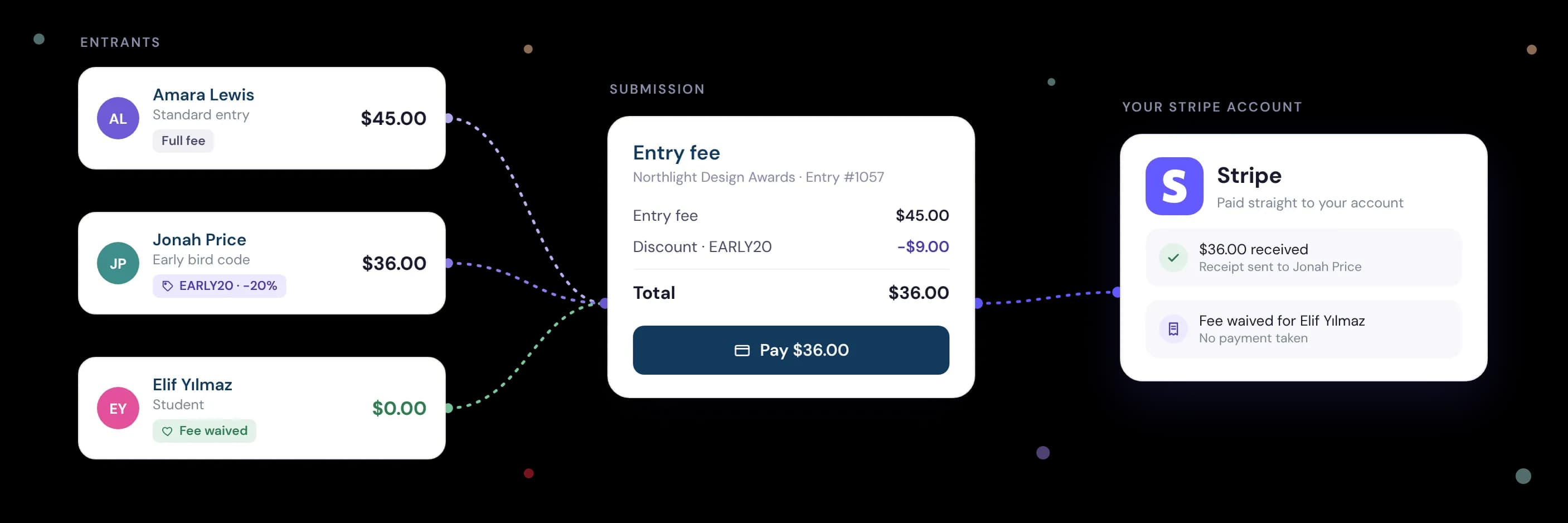
To take entry fees with Stripe, connect a Stripe account to your submission platform, set your fee on the entry form, and let entrants pay by card at the end of their application. The best setups send money straight into your own Stripe account, give every entrant a receipt in their account, and take no payment at all from people who qualify for a waiver.
Last updated: 6 November 2026
Reading time: 13 minutes
 Oz Osbaldeston, Co-founder & CEO, Dapple
Key takeaways
- Stripe charges per payment, with no monthly fee. A US card costs 2.9% + 30¢ on a US Stripe account; rates differ by country and card.
- Most submission platforms add their own fee on top. Check how big it is and whether the money goes to your Stripe account or the platform's.
- Price fairly. Too high and you shut people out; too low and you are swamped. A standard fee with discounts and waivers is usually the fairest approach.
- Waive fees up front rather than refunding later. Stripe doesn't return its processing fee on a refund, so every refund costs you money.
- Business entrants need proper invoices. If you charge VAT or need reverse-charge invoices, check your submission system can produce them.
Why use Stripe for award and open call entry fees?
Stripe is the most common way for awards, prizes, residencies and open calls to take entry fees online. It works in more than 40 countries, has no monthly fee, accepts cards from almost anywhere, and supports Apple Pay and Google Pay, so entrants can pay in a couple of taps without leaving the application. The more ways people can pay, the fewer drop out at checkout.
For programme teams, the bigger win is reconciliation. When payment is part of the entry form, each payment is tied to a specific entry. You don't need to match bank transfers to names, chase PayPal receipts or accept entries that "will pay later". An unpaid entry simply isn't submitted.
Stripe also handles the parts most organisers don't want to touch: card security (Stripe is PCI DSS Level 1 certified, so card details never pass through your systems), card authentication, fraud screening and payouts to your bank in your local currency. Your submission platform's job is to put the payment in the right place in the application, record it against the entry, and give the entrant a receipt.
How does Stripe work inside submission software?
More modern submission platforms connect to Stripe through Stripe Connect, Stripe's most complete way for a platform to take payments on your behalf. Older platforms often use an earlier type of Stripe integration, or built their own, and haven't moved over. With Stripe Connect, you create or link a Stripe account from inside the platform, and the platform can then take payments on your behalf. How the money moves after that depends on the platform, and it is the most important thing to check.
There are two common models:
- Payments go straight to your Stripe account. The entrant pays, the money lands in your Stripe balance, and the platform's fee is deducted at the same moment. You are paid out on Stripe's schedule, and you can see every payment in your own Stripe dashboard. Dapple, Zealous and Award Force (which connects to your own payment gateway) work this way.
- The platform collects the money and pays you later. The entrant pays the platform, the platform deducts its fees and remits the rest to you. Submittable's built-in payments work this way. It is simple to start with, but you depend on the platform's payout timing, which restricts your cash flow: you're usually paid a lump sum once a month. Your entrants also see the platform's name on their statement.
If cash flow, statement descriptors or owning your payment data matter to you, choose the first model.
How much does it cost to take entry fees with Stripe?
Stripe charges a percentage plus a fixed amount on each successful payment, with no setup or monthly fees. The rate depends on the country your Stripe account is in and where the entrant's card was issued. Because entries come from all over the world, budget for a mix of domestic and international cards.
| Stripe account | Card type | Stripe fee per payment |
|---|---|---|
| United States | US card | 2.9% + 30¢ |
| United States | International card | 4.4% + 30¢, plus 1% if currency conversion is needed |
| United Kingdom | Standard UK card | 1.5% + 20p |
| United Kingdom | European (EEA) card | 2.5% + 20p |
| United Kingdom | Other international card | 3.25% + 20p, plus 2% if currency conversion is needed |
| Eurozone | Standard European card | 1.5% + €0.25 |
Check Stripe's pricing page for the latest rates in your own country: Canada, Australia and other markets have their own rates.
Your submission platform's fee comes on top. To see what you'd pay in total on Dapple, including Stripe's fees, try the Dapple pricing calculator.
How do submission platforms compare on entry fees?
Platforms charge for payments in very different ways, so compare the total cost of a typical entry, not just the headline percentage. This table shows each platform's published payment model as of November 2026.
| Platform | Where entry fees go | Platform charge on payments | Payment processor fees |
|---|---|---|---|
| Dapple | Your own Stripe account | 2% + $0.25 / 2% + £0.20 / 2% + €0.20 per payment (variable on Pro plans) | Stripe's standard fees, billed by Stripe |
| Submittable | Submittable collects, then pays you | $0.99 + 5% per paid submission | Included in the 5% |
| Zealous | Your connected Stripe account | 2.2% + 25¢ (capped at $3) or 2.2% + 20p (capped at £2) | Stripe's standard fees, charged separately |
| Award Force | Your own payment gateway (Stripe, PayPal, Authorize.Net and others) | No commission on entry fees | Your gateway's fees |
“When we built payments into Dapple, the rule was simple: it's your money, so it should land in your account, not ours. Organisers shouldn't have to wait for a platform to pay them out, or explain to entrants why someone else's name is on their bank statement.”
 Oz OsbaldestonCo-founder & CEO, Dapple
How much should you charge for an entry fee?
Charge enough to cover what your programme costs to run, and no more. Entry fees should never be a profit centre built on applicants' hopes. Applicants notice, and the organisations they trust are the ones that are open about where the money goes.
Getting the level right matters in both directions:
- Too high and you limit who can apply. You lose emerging and under-represented applicants first, and your shortlist gets narrower as a result.
- Too low and you open the floodgates. Volume rises faster than quality, your judges are buried, and per-payment fees eat a large share of each fee.
In our experience, a hybrid is usually the best and fairest approach: a sensible standard fee, discounts for early entries, students or members, and full waivers for people who can't pay. Say plainly what the fee pays for, whether that's judging, admin, prize money or exhibition costs.
“I've been on both sides of this, as both an applicant and an administrator. An entry fee should help cover the cost of a fair review, not determine who gets the opportunity to be seen.The best programmes we work with charge a sensible entry fee, while offering discounts or waivers to those who might otherwise be priced out. The result? A broader mix of applicants, stronger submissions and very little impact on overall revenue.”
Oz OsbaldestonCo-founder & CEO, DappleHow do fee waivers make your call more accessible?
Fee waivers let people apply who otherwise couldn't, and the creative sector in particular has moved towards more accessible submissions in recent years. A waiver is the simplest way to show that your call is judged on the work, not on who can afford to enter.
Common waiver approaches include:
- Country-based waivers. Some organisations waive fees for applicants living in countries on the OECD DAC List of ODA Recipients, the low and middle-income countries eligible for official development assistance. It is an objective, published list, so the rule is easy to explain and apply.
- Means-based waivers. Applicants self-declare that they are on a low income, unwaged or receiving benefits.
- Group waivers. Free entry for students, members, partner organisations or under-represented groups you want to reach.
The key is to waive the fee before payment, not refund it afterwards. In Dapple, conditional logic can skip the payment step automatically (for example, when an applicant selects a DAC-listed country of residence), and fee bypass codes let individual applicants go straight through.
How do entry fee bursaries work?
An entry fee bursary gives a set number of applicants free entry, usually funded from the programme's budget or a sponsor. It suits calls that want to stay open to everyone without waiving fees across the board.
Some organisations allocate bursaries by random draw: applicants register interest, a fixed number are picked by lottery, and each winner receives a code for free entry. A lottery is quick to run, avoids asking applicants to prove hardship, and is easy to defend as fair.
Because bursary entrants never go through checkout, no payment is taken, so there are no Stripe or platform fees on those entries. That makes a bursary cheaper to run than charging everyone and refunding some of them.
How do you set up Stripe entry fees, step by step?
Setting up entry fees takes most organisations under an hour, plus however long Stripe takes to verify your details. In Dapple, the steps are:
- Connect Stripe. Create a new Stripe account or link an existing one from your organisation's settings. Payments are available on all paid plans.
- Complete Stripe's verification. Add your organisation's details, a bank account for payouts and identity documents. Stripe holds payouts until this is done, so do it before your call opens.
- Add fees to your form. Set a standard fee, plus payment tiers such as early-bird, late, student or multiple-entry pricing.
- Set up waivers and bursaries. Add conditional logic for country or means-based waivers, and create bypass codes for bursary winners, judges or partners.
- Set up tax and invoices if you need them. Turn on Stripe Tax and the tax ID field if you take entries from businesses.
- Test it. Submit a test entry and check the payment, the receipt and the entry record line up.
How do receipts, invoices and tax IDs work for entrants?
Every entrant should get a receipt they can find later, not just a confirmation email that gets lost. In Dapple, receipts are stored in the applicant's account, so entrants can download them whenever they need to.
Business entrants need more than a receipt. Companies entering industry awards usually need a proper invoice with their company details and tax ID so they can account for it and, where allowed, reclaim tax. Some submission systems, Dapple included, offer a tax ID field at checkout: when a business adds its tax ID, an invoice is generated and sent automatically.
This saves your team from issuing invoices by hand after the deadline, which is one of the most common admin headaches for awards with paid entries.
Do you need to charge VAT or sales tax on entry fees?
It depends on where your organisation is based, whether you are registered for VAT, GST or sales tax, and where your entrants are. There is no single rule. In the US, sales tax on entry fees varies by state; in the UK and EU, VAT often applies, with different rules for business and individual entrants across borders.
If you do need to charge tax, Stripe Tax can calculate the right amount for each entrant's location and show it at checkout. Cross-border business entries can need reverse-charge invoices, where the business accounts for the VAT itself.
Not every submission system can produce reverse-charge or other tax-specific invoices. If you need them, check before you choose a platform: Dapple supports configurable Stripe Tax and invoices for these cases. Either way, confirm your position with an accountant or tax specialist before you open a paid call.
Why should you avoid refunds?
Avoid refunds wherever you can, because they cost you money. When you refund an entry fee, the entrant gets the full amount back but Stripe keeps its original processing fee, so you pay to take the money and lose that fee when you give it back. Refunds also take staff time and can lead to disputes.
The best way to avoid refunds is to stop the wrong payments happening:
- Waive, don't refund. Take no payment from anyone who qualifies for a waiver or bursary.
- Make eligibility clear before checkout. Put eligibility questions early in the form, so ineligible applicants stop before they pay.
- Publish a clear refund policy. For example: no refunds once an entry is submitted, unless the call is cancelled.
When a refund can't be avoided, issue it from inside your submission platform if you can, so it is recorded against the entry. In Dapple, you can refund an applicant directly from their submission.
How do you stop entrants abandoning payment?
Some entrants fill in the whole form, reach the payment page and leave. Automatic reminders win a meaningful share of them back.
Most submission platforms offer some form of abandoned basket or draft reminder to nudge applicants to finish. Look for:
- Abandoned basket reminders. Entrants who reach checkout but don't pay are reminded automatically.
- Reminders for unused entries. Entrants who bought several entries but haven't submitted them all are reminded to finish.
- A clear view for entrants. Applicants can see which of the entries they've paid for are unused, in progress or completed.
Keep the payment step short and predictable too. Show the fee, and any waivers or discounts, at the start of the form, not just at checkout.
How does Dapple handle entry fees?
Dapple is a submission management platform for grants, awards, prizes, fellowships and open calls, used by organisations around the world, with entry fees built in through Stripe Connect. Entry fees go straight into your own Stripe account, and Dapple's transaction fee is deducted at the point of payment.
Payment features include:
- Payment tiers, multiple-entry baskets and fee bypass codes for waivers and bursaries
- Conditional logic to waive or change fees based on form answers, such as country of residence
- Receipts in every applicant's account
- A tax ID field that sends business entrants an invoice automatically
- Configurable Stripe Tax, including invoices for reverse-charge cases
- Card, Apple Pay and Google Pay checkout, in-platform refunds (Dapple's fee included), payment reports and reminders for abandoned baskets
See pricing for plan details and transaction fees.
Frequently asked questions
Do I need my own Stripe account to take entry fees?
On platforms that use Stripe Connect, yes, but you can usually create one from inside the platform in a few minutes. The money then goes to your account, not the platform's.
Can I take entry fees from applicants in other countries?
Yes. Stripe accepts cards issued almost anywhere, and entrants pay in the currency you set. International cards cost more to process, so factor that into your fee.
How long does it take to receive entry fees?
Stripe pays out to your bank on a rolling schedule, typically a few business days after each payment for established accounts. New accounts can have a longer first payout.
Can entrants pay with Apple Pay or Google Pay?
On Dapple, yes. Apple Pay and Google Pay are built into checkout alongside cards, so applicants can pay however suits them, including on a phone.
Should I waive fees for applicants from lower-income countries?
Many creative organisations do, often using the OECD DAC List of ODA Recipients as the rule. It widens your applicant pool and costs you nothing in processing fees, because no payment is taken.
Does Stripe refund its fee if I refund an entrant?
No. Stripe keeps its original processing fee on refunded payments, so waive fees up front rather than refunding later. On Dapple, our own transaction fee is refunded with the entry fee.
Is it safe to take card payments through a submission platform?
Yes, when the platform uses Stripe. Card details are handled by Stripe, which is PCI DSS Level 1 certified, and never stored by the platform or by you.