How to Automate High-Volume Award Entries (2026 Guide)
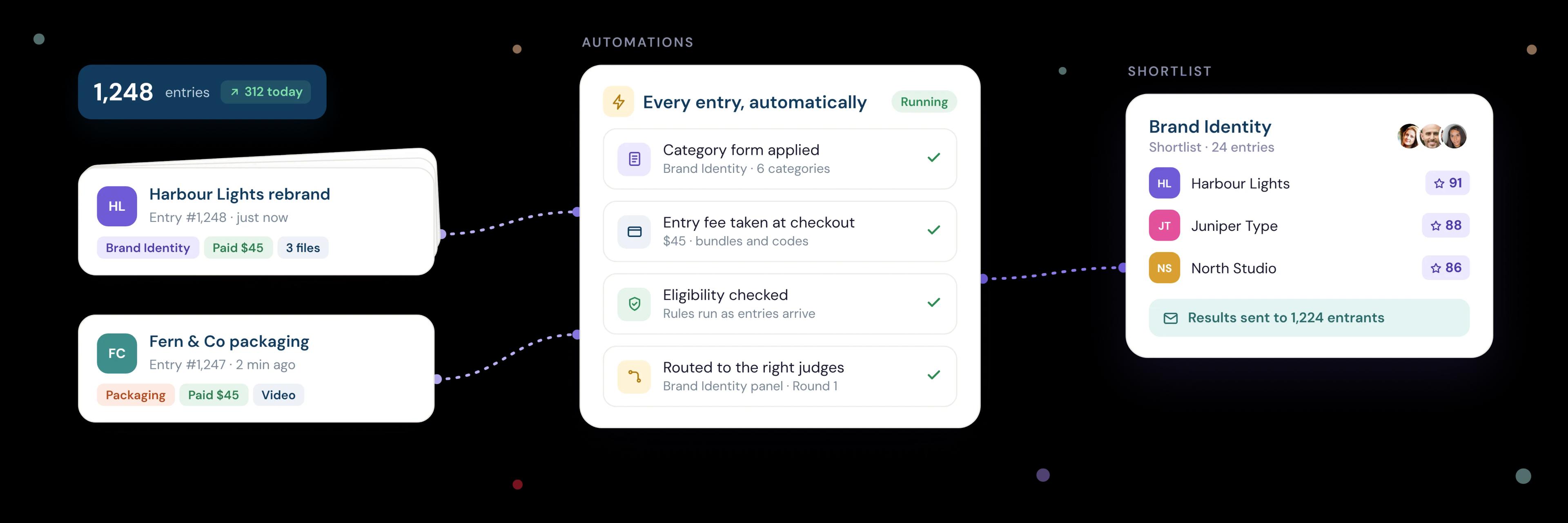
To automate high-volume award entries, build your rules into the entry process itself. Use one entry form that adapts to each category, and take payment at checkout. Check eligibility as entries arrive, route each entry to the right judges automatically, and send reminders and results in bulk. Your team then spends its time on the shortlist, not on sorting.
Last updated: 6 November 2026
Reading time: 12 minutes
 Oz Osbaldeston, Co-founder & CEO, Dapple
Key takeaways
- Automate the admin, not the judgement. Rules and AI can check, sort and route entries, but judges should still make every decision.
- In a large awards programme, most of the work happens before judging starts: chasing drafts, matching payments, checking eligibility and splitting entries between judges.
- Settle your categories and eligibility rules before you open, so software can apply them the same way to every entry.
- Take payment as part of the entry, so every submitted entry is already paid for and recorded.
- Judge in rounds. A quick first round across every entry, then deeper scoring on the shortlist, keeps each judge's workload manageable.
When does an awards programme count as high volume?
An awards programme counts as high volume once manual tracking stops keeping up. For most teams that point comes earlier than they expect: a few hundred entries, several categories or more than one judging round. Thousands of entries is common for open awards with low entry fees.
The warning signs are usually admin, not judging:
- Entries are tracked in a spreadsheet that only one person understands.
- Someone matches bank transfers or card payments to entries by hand.
- Judges receive entries as email attachments or shared folders.
- Entrants email to ask whether their entry arrived or what happens next.
- The week after the deadline is spent checking entries rather than judging them.
The volume itself isn't the problem. The problem is running a large programme without a system that applies the same rules to every entry.
Which parts of the awards process can you automate?
You can automate almost everything except the final judgement. This table shows where the time goes in a typical awards programme, and what software can take on.
| Stage | The manual way | The automated way | What stays human |
|---|---|---|---|
| Entry forms and categories | A separate form or email address for each category | One form that shows the right questions for each category | Deciding the categories and criteria |
| Entry fees | Invoices, bank transfers and matching payments to names | Payment at checkout, with multi-entry pricing, waiver codes and automatic receipts | Setting fees, discounts and waivers |
| Unfinished entries | Manual chaser emails before the deadline | Scheduled reminders for unfinished drafts and abandoned checkouts | Deciding the reminder schedule |
| Eligibility | An admin reads every entry against the rules | Knock-out questions on the form, plus AI checks that flag entries against your criteria | The final call on anything flagged |
| Sorting | Spreadsheet columns and colour coding | Automatic tags by category, answers or AI findings | Choosing what to tag |
| Judge allocation | Emailing batches of entries to each judge | Automations that move entries to a stage and send them to judges, split evenly | Choosing the judges |
| Results | Mail merges and individual emails | Bulk messages to every entrant in a stage | The decision itself |
How do you handle many categories without building dozens of forms?
Use one entry form with conditional logic, so each entrant only sees the questions for the category they choose. A photography category can ask for images and a caption, while a writing category asks for a manuscript and word count, all on the same form.
This keeps every entry in one place, with the same fields in the same format, so you can sort, filter and report across all categories at once. It also means you change a shared question once, not in twenty places.
A few habits make multi-category awards easier to run:
- Put the category question first. Everything that follows can then adapt to it.
- Split long forms into steps. Entrants see their progress, and fewer give up halfway.
- Give each category its own judges and criteria. A specialist panel per category is fairer than one panel judging everything.
- Let entrants enter several categories in one checkout. A basket of entries means one payment instead of several, and entrants can see which entries they've paid for but not yet started.
How do you take payment for hundreds of entries without matching them by hand?
Take payment as part of the entry, at checkout. When payment is built into the form, each payment is recorded against a specific entry, and an unpaid entry is never submitted. There is nothing left to reconcile after the deadline.
For high-volume awards, look for:
- Multi-entry pricing, such as early-bird and late fees, or a discount for entering several categories.
- Codes that skip payment, for sponsors, partners, judges' nominees or anyone you've granted a fee waiver.
- Automatic receipts in each entrant's account, and invoices for business entrants who add a tax ID.
- Payment reports you can download in one click for your finance team.
Our guide to taking entry fees with Stripe covers costs, fair pricing, waivers and tax in detail.
How do you check eligibility automatically?
Check eligibility in two layers: stop ineligible entrants on the form before they pay, then check what gets through against your criteria as entries arrive.
Layer 1: the form. Put eligibility questions at the start, such as country of residence, career stage, date of completion or whether the work has been published before. Use conditional logic so an entrant who answers "no" to a required condition is stopped with a clear message, not allowed through to checkout. Required fields and file rules (file type, size, number of images) catch most incomplete entries before they're submitted. This also cuts refunds, because ineligible entrants never pay.
Layer 2: checks on what's submitted. Some rules can't be checked by a form question: whether an image matches the brief, whether a statement meets the word count, or whether the entry fits the category it was entered in. Traditionally an admin reads every entry to check. AI can now do a first pass:
- It checks each entry against eligibility criteria you set in advance.
- It flags entries that look ineligible, incomplete or in the wrong category, and writes a short summary of what it found.
- Based on its findings, it can tag the entry, move it to the right stage or send it to a team member to look at.
The important word is "flag". AI should never reject an entry on its own. A person checks anything flagged and makes the call, and entries that pass go straight on to judging. On Dapple, AI agents can be set to do this as entries arrive.
How do you route entries to the right judges automatically?
Set up your awards as a series of stages, then add rules that move entries between them and send them to judges. Once an entry passes the eligibility stage, for example, it can move to its category's first judging round and appear in those judges' queues without anyone sending it.
The tools that make this work at scale:
- Automations move entries between stages, send them to judges and message entrants when something happens, such as an entry reaching the shortlist.
- Review pools send entries to a group of judges automatically and divide them evenly, so no judge gets three times as many as another.
- Minimum and maximum reviews per entry make sure every entry is seen by enough judges, and stop popular categories eating everyone's time.
- Tags route entries by category, region or anything else on the form.
- Judge queues show each judge only the entries sent to them, split into pending and completed, so nobody needs a spreadsheet to know what's left.
Keep judging fair while you automate. Hide entrant names and any identifying fields from judges (anonymous judging), and use the same criteria for every entry in a round.
How should you structure judging rounds for thousands of entries?
Judge in rounds, with the quickest decisions first and the deepest scoring last. A detailed rubric on every entry sounds thorough, but it doesn't scale: judges tire, scores drift and deadlines slip.
A common structure for large awards:
- Eligibility check. AI flags and an admin confirms. No judges involved.
- First round. Two judges give each entry a quick vote, such as Yes, No or Maybe. For visual entries, a slideshow view lets judges move through work fast.
- Shortlist round. Judges score the top 10% or so against a weighted rubric with written guidance.
- Final jury. A small panel discusses the finalists and picks the winners.
Worked example: 2,000 entries and 20 judges
| Round | Entries | Reviews per entry | Total reviews | Judges | Reviews per judge |
|---|---|---|---|---|---|
| First round (quick vote) | 2,000 | 2 | 4,000 | 20 | 200 |
| Shortlist (rubric scoring) | 200 | 3 | 600 | 10 | 60 |
| Final jury | 20 | 5 | 100 | 5 | 20 |
At about two minutes per quick vote, the first round is under seven hours per judge, spread over a couple of weeks. Asking every judge to score all 2,000 entries in full would be impossible. The numbers are illustrative, but the shape holds for most large awards: wide and fast first, narrow and careful last.
After each round, sort entries by average score or by votes, then move the top entries to the next stage in bulk.
How do you keep thousands of entrants informed without answering every email?
Give every entrant an account where they can see their entries, and send updates in bulk at each stage. Most entrant emails ask the same three things: did my entry arrive, did my payment go through, and when will I hear. An applicant account answers all three.
The automated messages worth setting up:
- Draft reminders to entrants with unfinished entries before the deadline.
- Checkout reminders to entrants who reached the payment page but didn't pay.
- Unused entry reminders to entrants who bought several entries but haven't submitted them all.
- Stage updates and results, sent to everyone in a stage at once, whether that's 20 finalists or 2,000 entrants who didn't make the shortlist.
A kind, prompt "not this time" message matters. How you treat the entrants who don't win shapes whether they enter again next year.
How do you handle the deadline rush?
Plan for most entries to arrive in the last few days. Late surges are normal for awards, and the risk isn't the software. It's entrants who leave it too late, hit a problem and email you at midnight.
To spread the load and reduce last-minute problems:
- Offer early-bird pricing so entrants have a reason to submit early.
- Schedule reminders at two weeks, one week and two days before the deadline.
- Decide your extension policy in advance. Announce it once, for everyone, if you need it.
- Make the form forgiving. Clear file rules, autosaved drafts and a short checkout prevent most deadline-day emails.
- Choose a plan with headroom. Check your platform's yearly entry allowance against your best year, not your average one.
Where should AI fit in a high-volume awards process?
AI should take the admin, and people should make the decisions. Use it where a task is repetitive and rule-based: checking entries against eligibility criteria, summarising long entries, tagging, and routing entries to the right stage or judges. Keep it away from deciding who wins.
Used this way, AI changes where your team spends its time. Instead of reading 2,000 entries to find the 60 with a problem, an admin reviews the 60 that were flagged. Judges get a short summary alongside each entry, without it replacing their own reading of the work.
AI is also useful after judging. With an AI integration, you can ask questions of your entry data in plain English, such as how entries split by country or which categories grew, and get reports and charts back in seconds.
Be open with entrants about how you use it. A line in your entry guidelines saying that AI helps with admin checks, and that judges make every decision, builds trust.
“I started out managing music events, often faced with hundreds of demos to review in one sitting. Plenty were the wrong genre, while some of the best tracks risked getting buried in the admin. That's one of the reasons we built Dapple: let the software handle the sorting, so judges can focus on giving every entry the attention it deserves.”
 Oz OsbaldestonCo-founder & CEO, Dapple
How do you set up automated award entries, step by step?
Most organisations can set up a high-volume awards programme in a day or two. In Dapple, the steps are:
- Create your entry form. Start from an awards template, or describe your award in a sentence and let the AI form builder draft the form for you to edit.
- Add categories and eligibility questions. Put both at the start of the form, and use conditional logic to show the right questions for each category and stop ineligible entrants before checkout.
- Set up entry fees. Connect Stripe, then add your standard fee, early-bird and late pricing, multi-entry discounts and codes for waivers.
- Build your stages. For example: Received, Eligibility check, First round, Shortlist, Final, Winners.
- Add a Review Round to each judging stage. Choose the scoring (votes, ratings or a weighted rubric), write guidance for judges, and set how many judges see each entry.
- Add automations. Move entries between stages, send them to judges and message entrants automatically.
- Schedule reminders. Set up draft reminders before the deadline and reminders for abandoned checkouts.
- Test it end to end. Submit a few test entries in different categories and check each one lands in the right place.
How does Dapple handle high-volume awards?
Dapple is submission management software for grants, awards, prizes, fellowships and open calls, used by organisations around the world. It's built to take the admin off your team, so a programme with thousands of entries runs with the same effort as one with hundreds.
Features for high-volume awards include:
- One entry form per award with conditional logic, form steps and an AI form builder
- Entry baskets, multi-entry pricing and codes, with payments going straight to your own Stripe account
- A visual stages board, with bulk updates to move hundreds of entries at once
- Automations to move entries, send them to judges and message entrants
- Review Rounds with votes, ratings or weighted rubrics, review pools, and anonymous judging on every plan
- Slideshow judging for visual entries
- Draft, checkout and unused-entry reminders, plus bulk messages to every entrant in a stage
- AI agents that check eligibility, summarise entries, tag them and route them to the right stage or reviewer
- An MCP integration to analyse your entry data with Claude or ChatGPT
Plans come with generous yearly entry allowances of up to 10,000 entries, so a busy year doesn't push you onto a new plan mid-cycle. See pricing for details.
Frequently asked questions
How many entries counts as high volume for an awards programme?
There's no fixed number, but most teams outgrow spreadsheets and email at a few hundred entries, or as soon as they have several categories and more than one judging round.
Can AI judge award entries?
It shouldn't. AI is useful for admin: checking eligibility, summarising entries, tagging and routing. Judging should stay with people, and entrants should know that it does.
What's the fairest way to split entries between judges?
Send entries to a pool of judges and divide them evenly, with a set number of judges per entry. Hide entrant names from judges, and use the same criteria for every entry in a round.
Can entrants enter several categories in one payment?
On Dapple, yes. Entrants can buy several entries in one checkout and see which ones they've used, started or not yet begun from their applicant account.
How do I stop ineligible entries before entrants pay?
Put eligibility questions at the start of the form and use conditional logic to stop anyone who doesn't meet a required condition. This saves you refunds as well as checking time.
What happens if most entries arrive on deadline day?
That's normal for awards. Early-bird pricing and a schedule of reminders spread entries out, and a clear, autosaving form keeps deadline-day support emails to a minimum.
Will automating our awards make judging less personal?
It should do the opposite. When software handles the checking, sorting and chasing, judges and your team have more time for the entries themselves.
Sources
Explore More
Awards Management Software
See how Dapple runs every category of your awards in one place.
The Best Award Management Software in 2026
11 award platforms compared on pricing, entry fee commission, judging and setup.
How to Take Entry Fees with Stripe
Real costs, fair pricing, waivers, bursaries, invoices, tax and why to avoid refunds.