Workflow Automation for Submission and Award Processes: How the Main Platforms Compare
 By Oz Osbaldeston, Co-founder & CEO
Last updated 20 November 2026
Workflow automation in submission and award software means each entry moves through stages you define, and the platform acts when it arrives at each one. It can send it to reviewers, message the applicant, tag it, or check it against your criteria. Nearly every platform automates something. They differ in where the rules live (on stages, on rounds or on a schedule), how much you can configure yourself, and whether AI can act on an entry or only summarise it.
In short: an automated submission workflow has four building blocks:
- Configurable stages: the steps an entry passes through, from intake to decision.
- Per-stage automations: actions that fire when an entry reaches a stage.
- Review rounds: each round has its own reviewers, criteria and scoring.
- AI routing: checks eligibility, summarises entries and sends them to the right place.
The rest of this guide explains each one, compares how nine platforms handle them, and shows how to find the admin you can automate in your own process.
What are the benefits of automating high-volume award entries?
The main benefit is that admin no longer grows in line with entry numbers. Without automation, every entry costs the same handling time: acknowledging it, checking eligibility, confirming the category, assigning reviewers, chasing missing material and updating its status. Double the entries and you double the admin.
Here's a rough illustration. If those tasks take three minutes per entry, 2,000 entries means 100 hours of handling before a reviewer reads anything. When the platform does the routine steps as entries arrive, that time goes into the work that needs a person: borderline eligibility calls, reviewer questions and the final decisions.
For high-volume programmes, automation also brings:
- Consistency. Every entry gets the same checks and the same messages. Nothing depends on who was on shift.
- Speed to review. Entries reach reviewers as soon as they qualify, instead of waiting for a weekly batch.
- Visibility. Everyone can see how many entries sit at each stage and where things are slowing down.
- Fewer dropped entries. Reminders go out automatically to applicants with unfinished drafts or unpaid fees.
- Growth without new hires. You can open another category or programme without adding headcount.
What are the four building blocks of an automated submission workflow?
Configurable stages
A stage is a step in your process, such as New, Eligibility check, First round, Shortlist or Winners. Configurable stages let you set those steps to match how your programme runs, instead of a fixed template. Look for three things. First, how many stages you can add. Second, whether applicants see a friendlier status label than your internal stage name. Third, whether you can see every stage at once on a board.
A stages board shows every stage as a column and every entry as a card, the way Trello does for tasks. The idea isn't new, but it's still rare in application management software, where list views and spreadsheets are the norm. A board shows at a glance how many entries sit at each stage and where things are slowing down, and moving an entry on is a drag and drop.
Boards are especially useful when the work is visual: art, film, photography, design or headshots, where you want to see the entry, not a row of text. They help with document-heavy programmes too. In Dapple, each card on the Stages board shows a thumbnail of the entry, and one click opens a preview of the image, video or document without downloading anything. Each project can have unlimited stages. Each stage has an internal name for your team and a separate display name that applicants see as their status. Each stage also carries its own automations and Review Rounds, so the stage is where the rules live.
Per-stage automations
A per-stage automation is a rule that runs when an entry enters a particular stage. That differs from global rules that apply to the whole programme. Per-stage rules let a first-round stage behave differently from a shortlist stage: different reviewers, different messages, different follow-up.
Common per-stage automations include:
- sending the entry to a review round and assigning reviewers
- sending a message to the applicant, such as an acknowledgement or a polite rejection
- adding or removing a tag, so entries are labelled by what has happened to them
- assigning an internal Owner to look after the entry
- reminding applicants who have unfinished drafts
- triggering a webhook that pushes the entry's data to an external tool, such as a CRM
Dapple supports all of these at the stage level, so a first-round stage and a shortlist stage can each do their own thing without anyone moving entries or sending emails by hand.
Review rounds
A review round is one pass of assessment, carried out by a defined group of reviewers or judges. Each round has its own criteria and scoring. Multi-round judging is standard in awards, for example a broad sift followed by a scored jury round. What matters is how independent each round can be.
In Dapple, each Review Round sits on a stage. It has its own:
- scoring type (a rating or a rubric) and criteria
- reviewer guidance and deadlines
- notifications to reviewers and admins
- Review Group (the people taking part)
You can also set custom voting options beyond yes/no/maybe, optional comment boxes, minimum and maximum reviews per entry, a conflict-of-interest declaration, and anonymous review in both directions: you can hide applicant details from reviewers, and hide reviewers' identities from the admin team.
Applicant feedback without copy and paste. Each Review Round can include feedback fields written for the applicant. Add the feedback merge tag to a message, and Dapple drops each applicant's own feedback into their copy. One message goes to hundreds of applicants, each with personal feedback, instead of feedback being pasted and sent one applicant at a time.
AI reviewers alongside people. You can add an AI reviewer to any Review Round and give it its own criteria. It reviews entries alongside your human reviewers, much like Submittable's Smart Reviewer. It can give an initial read on high-volume rounds, add a second view next to your judges, or highlight entries that need a closer look.
AI routing
AI routing uses AI to read an entry and decide where it goes next, under rules you set. It differs from summarisation, where AI only helps a person read faster. Routing is where the biggest admin savings sit at volume, because sorting entries is the job that otherwise falls to the programme team.
In Dapple, the AI:
- checks each application against eligibility criteria you set up in advance
- flags issues, such as a missing document or the wrong category
- writes a short summary of each application
- can tag the entry, move it to the right stage or assign it to the right reviewer, based on what it finds
People still make every decision on outcomes. The AI does the sorting, so your team's time goes on the entries themselves.
Which submission platforms support custom workflow automation?
All nine platforms below support multi-round review and some level of automation. The bigger difference is the design. Some platforms are stage-centred: rules attach to the steps an entry moves through. Others are round-centred: the process runs on judging rounds that open and close on dates. Stage-centred platforms tend to suit programmes with eligibility checks, holding stages and post-award steps. Round-centred platforms suit awards that run to a fixed judging calendar.
| Platform | How the workflow is structured | Automations | Review rounds | AI checks and routing |
|---|---|---|---|---|
| ✦ Dapple | Stage-centred. Unlimited stages per project on a visual, Trello-style Stages board, with thumbnails and one-click previews of entries. Status labels shown to applicants. | Set per stage: send to a review round, assign reviewers, message applicants (including auto-reject), add or remove tags, assign an Owner, draft reminders, trigger webhooks to external tools such as a CRM. | Review Rounds on each stage, each with its own scoring, criteria, guidance, deadlines and notifications. Applicant feedback sent in bulk with a merge tag. | AI eligibility checks, summaries, tagging, routing to stages or reviewers. AI reviewers with their own criteria, working alongside human reviewers. More agents across the application journey coming soon. |
| Submittable | Stage-centred. Multi-stage review workflow, with as many stages as needed, each mapped to a round. | Auto-assign reviewers when entries arrive or move stage. Auto-labels from form answers. Criteria-based movement through stages. | A custom review form or a yes/no vote per stage. | Smart Summary, plus Smart Reviewer, which scores against your rubric alongside human reviewers. |
| SurveyMonkey Apply | Stage-centred. Typed stages (applicant, simple review, advanced review, holding), with concurrent review stages. | Visual rule editor. Triggers based on a date or a workflow milestone. Moves applications when requirements are met. Rule-based reviewer distribution. | Simple and advanced review stages. | Check with vendor. |
| Good Grants | Stage-centred. Review stages linked together through its Action flow settings. | Action flow moves applications and sends notifications. Random reviewer assignment per score set and round. Zapier and Make integrations. | Reviewing rounds with score sets. | Describes automated eligibility screening. Check the scope of AI with the vendor. |
| Submit.com | Stage-centred. Phased applications, each phase with its own forms, review tools and decision logic. | Auto-scoring against your criteria to produce a league table before manual review. Auto-reject when a disqualifying answer is selected. | Review per phase. | Check with vendor. |
| Award Force | Round-centred. Entry, judging and feedback rounds open and close by date, organised by categories and tag-filtered panels. | Auto-scoring for moderation before judging. Automations available. | Four judging modes (Qualifying, Top Pick, Voting, VIP) that can be combined across rounds. | Opt-in AI tools: summaries, data extraction, feedback drafts, initial moderation and score normalisation. |
| OpenWater | Round-centred. Rounds that are either submission + judging or judging only, combined to fit your process. | Reminders and notifications. More than 65 AMS, CRM and payment integrations. | Judging per round. | OpenWater AI, an opt-in beta for existing customers since early 2026. |
| Zealous | Round-centred. A schedule of entry opening, closing and judging rounds. | Automated schedule and emails. | Multiple rounds, each with its own scoring. Shortlists and public vote rounds. | None. |
| Evalato | Round-centred. Multiple evaluation rounds. | Automatic emails and tags. | Unlimited rounds, each with its own scorecard (criteria, weights, scales). Six voting types. | None. |
Based on each vendor's public website and help documentation as of November 2026. Features change often, so confirm details with the vendor.
Here's how each of the other platforms approaches it.
SurveyMonkey Apply: powerful rules, detailed set-up
SM Apply has one of the most detailed rule builders in the category. Each automation has a WHEN statement (the triggering event, such as a completed task or review), conditions that must match ALL or ANY of your rules (and can be nested), and DO actions. Automations can also fire at a set date and time, or when a programme, stage or task deadline opens or closes. Each programme has its own workflow of applicant, review and holding stages.
Good fit if your team is happy to invest time building and maintaining detailed rules.
Submittable: strong automated review for grants
Submittable's automated review covers auto-labelling, auto-assignment to reviewers, custom calculations and criteria that move applicants through stages automatically. Reviewer groups can be auto-assigned to each stage of a multi-round process. Its Smart Reviewer AI assesses applications against your scoring rubric alongside your human reviewers.
Good fit if you run larger grant programmes and want automated scoring and fraud checks.
Award Force: structured flows for awards
Award Force automates around fixed building blocks rather than an open rule builder. Its review flow sends an entry to a reviewer who approves or rejects it, and the outcome decides who sees it next. Judging panels show entries to judges based on criteria, judges can be assigned randomly, and tags (such as Gold or Finalist) can trigger notifications and certificates. Its AI fields, launched in January 2026, summarise and analyse entries and can run when an entry is submitted, moderated or tagged. They're opt-in and focused on insight rather than routing.
Good fit if you run awards and want proven, well-documented building blocks.
Good Grants: action flow for grant approvals
Good Grants (from the same company as Award Force) uses “action flow” to route an application through as many action stages as you need. At each stage a reviewer approves the application to continue or rejects it to stop it, and you can set up different flows for different categories. For automation beyond the platform, it connects to Zapier and Make.
Good fit if you need approval chains such as manager sign-off or referee checks. Organisations running both awards and grants may need two separate products.
OpenWater: flexible rounds for associations
OpenWater builds workflows from rounds that are either submission + judging or judging only, and you combine them to fit your process. Its strength is integrations: it lists more than 65 AMS, CRM and payment connections. OpenWater AI has been an opt-in beta for existing customers since early 2026.
Good fit if you're an association that needs the platform to sync with your membership system.
Submit.com: phased applications for the public sector
Submit.com breaks programmes into phases, each with its own forms, review tools and decision logic. It can auto-score applications against your criteria to produce a league table before manual review, and auto-reject applications when a disqualifying answer is selected.
Good fit if you're a UK or Irish public body or funder with a staged, eligibility-led process.
Evalato: unlimited rounds, email-led automation
Evalato supports unlimited evaluation rounds, each with its own scorecard, and conditional logic within entry forms. Its automation centres on communication: action-based emails can go out when you tag an application, for example.
Good fit if you run awards or competitions where the main time sink is emailing entrants and judges.
Zealous: schedule-driven open calls
Zealous automates the timeline: submissions open and close and results publish on the dates you set, and confirmation emails go out automatically. Judging runs in rounds, with admins moving entries from one round to the next.
Good fit if you run a straightforward creative open call or competition with a fixed schedule.
Questions to ask any vendor
Use these questions to check whether a platform supports custom workflow automation, and not only automated emails:
- Can I add as many stages as I need, and name what applicants see separately from what my team sees?
- Are automations set per stage, or only programme-wide?
- What triggers an automation: arriving at a stage, a date, a form answer, a completed review?
- Can each review round have different reviewers, criteria, scoring and deadlines?
- Can AI act on an entry (tag, move, assign), or only summarise it? Can I see why it flagged something?
- How do I declare and handle reviewer conflicts of interest?
- Can I run several programmes with different workflows on one plan?
- Which plan tier includes automations, AI and webhooks?
- Can you show me an application going down two different paths automatically?
- What happens if we change the rules halfway through a cycle?
A single-round open call with one judging panel doesn't need much more than scheduled emails. Once you have several stages, different review teams or a mix of grants and awards, you need rule-based automation with review settings at every stage.
How can you find the admin in your intake process that automation can remove?
Start by mapping your current process step by step, from the moment an entry arrives to the moment the applicant hears the outcome. Mark every step where someone copies data, chases a person, moves an entry or sends a message. Those are the steps that automation removes. Steps where someone weighs quality, fairness or context stay with people.
| Intake task | What automation can take on | What stays with people |
|---|---|---|
| Acknowledging entries | Automatic confirmation on submission | Nothing |
| Eligibility checks | AI checks against your criteria and flags issues | Borderline or unusual cases |
| Category and tagging | AI tags entries and flags wrong categories | Final category calls on appeals |
| Assigning reviewers | Stage automations send entries to the right Review Group | Choosing who sits on each group |
| Chasing drafts and payments | Automatic reminders | Exceptions such as fee waivers and extensions |
| Status updates | Applicant status changes with the stage | Personal notes to key applicants |
| Conflicts of interest | Reviewers declare conflicts in the platform | Deciding how to reassign |
| Shortlisting and winners | Scores and summaries gathered in one view | The decision itself |
| Feedback to applicants | Feedback written once per entry, then sent to every applicant in one message using a merge tag | Writing feedback that's useful |
A practical way to start:
- Time one cycle. Note roughly how long each admin step takes per entry in your next round.
- Automate the repetitive messages first. Acknowledgements and reminders are low-risk and save time straight away.
- Add reviewer assignment. Attach a review round to a stage so entries reach reviewers as soon as they qualify.
- Bring in AI checks. Let AI flag eligibility issues and summarise entries, and keep a person confirming edge cases for the first cycle.
- Review after the cycle. Compare the time per entry with your baseline and decide which rules to tighten.
What does agentic workflow automation look like?
Agentic workflow automation goes a step beyond rules. A rule says “when an entry reaches this stage, do this”. An AI agent carries out a whole job: it reads the entry, weighs it against the criteria you've set, chooses the right next step and hands the decisions back to people. Rules move entries along. Agents do the thinking-heavy admin that rules can't, such as spotting a wrong category or summarising a 20-page proposal.
Dapple's aim is an agent for each part of the application journey, with the Dapple AI assistant as the one place your team talks to and directs them from:
| Part of the journey | What the agent does | Status |
|---|---|---|
| Setup | Builds your form, stages and Review Rounds from an old form or your website | Coming soon |
| Screening | Checks eligibility, writes summaries, tags entries and routes them to the right stage or reviewer | Live |
| Review | Joins a Review Round alongside human reviewers and scores against the criteria you give it | Live |
| Communication | Drafts applicant messages, reminders and feedback | Coming soon |
| Reporting | Produces board-ready and impact reports, and answers plain-English questions about your programme | Coming soon |
| After the award | Tracks payments, progress reports and milestones | Coming soon |
Dapple also connects to AI tools teams already use. Through its MCP connector, you can work with your Dapple data from Claude or ChatGPT, for example to analyse results or build reports and charts.
Whatever the agent, the principle is the same: agents take on the admin, and people make every decision about who is shortlisted, funded or wins.
Example: a three-strand fellowship built in Dapple
Here's how an arts foundation might run a fellowship with visual arts, writing and music strands:
- Submitted. An AI agent checks each application against the eligibility criteria, flags anything missing, writes a summary and tags the strand.
- Routed by strand. Each application moves automatically to its strand's stage, where a review round with a specialist review group scores it against strand-specific criteria.
- Flagged. Applications that may not meet the criteria go to a holding stage for your team to check, so no one is ruled out by AI alone.
- Shortlist. Your team moves the strongest applications to an interview stage with its own review round and scoring.
- Awarded. Successful fellows move to the award stage, with funds tracked in fund management, and finalists can be shown in a public gallery.
Every step runs in one project, and the foundation's other programmes run side by side with their own rules.
How does Dapple handle workflow automation?
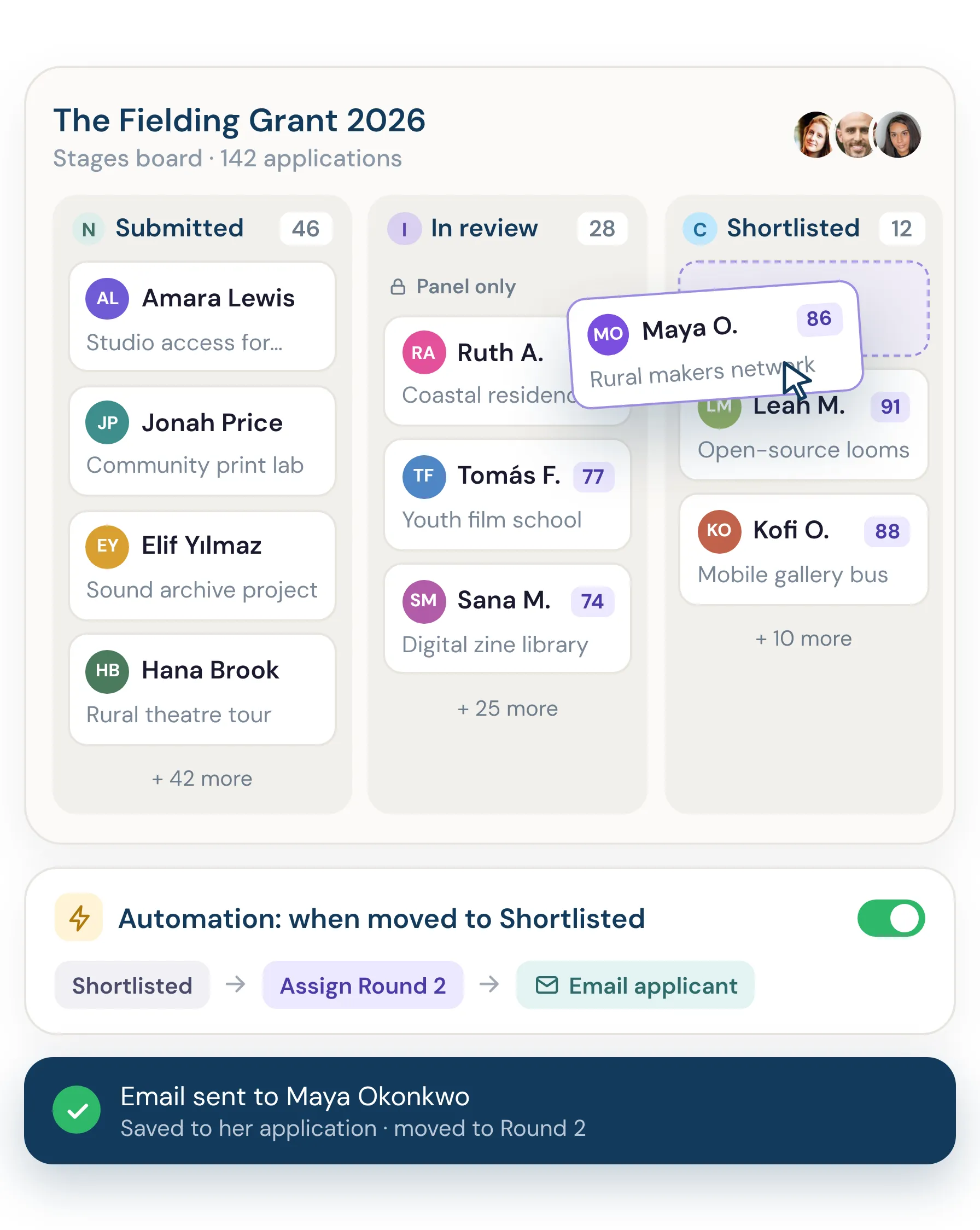
Dapple is an intelligent submission management platform for grants, awards, prizes, fellowships and open calls, built AI-first rather than with AI added to an older system. Its workflow is built on stages. Each project has unlimited stages on a visual Stages board, and every stage can carry its own automations, Review Rounds and AI agents. Agents check eligibility, write summaries, tag entries, route them to the right stage or reviewer and review alongside your judges, with more agents across the whole application journey on the way. People make every decision.
Organisations can run several projects, each with its own forms, rules and workflow, across multiple teams with their own reviewers. That means an awards programme and a grant programme can sit side by side without needing two platforms. Entry fees, galleries and public voting can each be set up per stage, and stage webhooks send data on to other systems as entries progress. Workflow automations are included on the Growth plan and above.
See how stages, automations and Review Rounds fit together at dapplehq.com.
Frequently asked questions
What is workflow automation in award management?
Workflow automation in award management is software that moves entries through defined stages and carries out routine actions at each one. Those actions include acknowledging entries, assigning judges, sending reminders and updating statuses. People don't have to do each step by hand.
Can AI decide award winners?
AI shouldn't decide outcomes, and responsible platforms don't present it that way. AI is useful for admin: checking eligibility, summarising entries, tagging and routing them, or giving a second view next to human reviewers. Judges and programme teams make the decisions.
Do I need technical skills to set up automations?
No. Modern submission platforms set up automations through menus and toggles, not code. In Dapple, you add an automation or a Review Round directly to a stage on the Stages board.
Is workflow automation only worth it for large programmes?
No. Smaller programmes benefit from automated acknowledgements and reminders straight away. The savings from AI checks and automatic reviewer assignment grow with volume, so they matter more once a programme receives hundreds of entries.
Can AI review applications alongside human judges?
Yes. Some platforms let you add an AI reviewer to a review round. Submittable calls its version Smart Reviewer. In Dapple, you add an AI reviewer to a Review Round and give it its own criteria, and it reviews entries next to your human reviewers. It's useful for an initial read on high-volume rounds or as a consistency check, while judges make the final calls.
Which submission platform has the most customisable workflows?
Dapple offers the most customisable workflows: unlimited stages per project, separate review rounds with their own rules at every stage, automations across the whole flow, AI agents that route applications between stages, and multiple organisations, teams and projects in one account. SurveyMonkey Apply and Submittable also offer deep rule-based automation.
Can AI route applications automatically?
Some platforms can. Dapple's AI agents check eligibility, tag applications and route them to the right stage or reviewer, and they can also be assigned to submissions to work alongside your human reviewers. Submittable's Smart Reviewer scores applications against your rubric alongside human reviewers. Award Force's AI fields summarise and analyse entries but are focused on insight rather than routing.
Do I need Zapier or Make to automate my workflow?
Not for workflows inside the platform if it has its own automation. Zapier or Make are useful for connecting to other tools, such as a CRM or finance system. Dapple has stage-based webhooks, so an application's data can be pushed to another system, such as a CRM, as soon as it reaches a particular stage. It also has an API, Zapier and connectors for AI tools such as Claude and ChatGPT. Webhooks, the API and Zapier are on the Pro plan.
Are workflow automations included on every plan?
It depends on the platform. In Dapple, automations are included on the Growth plan and above. Many other vendors only share pricing on request, so ask which automations each plan includes.